Premiere in front, Premiere buttons on your phone
A Premiere Pro shortcut deck on your iPhone.
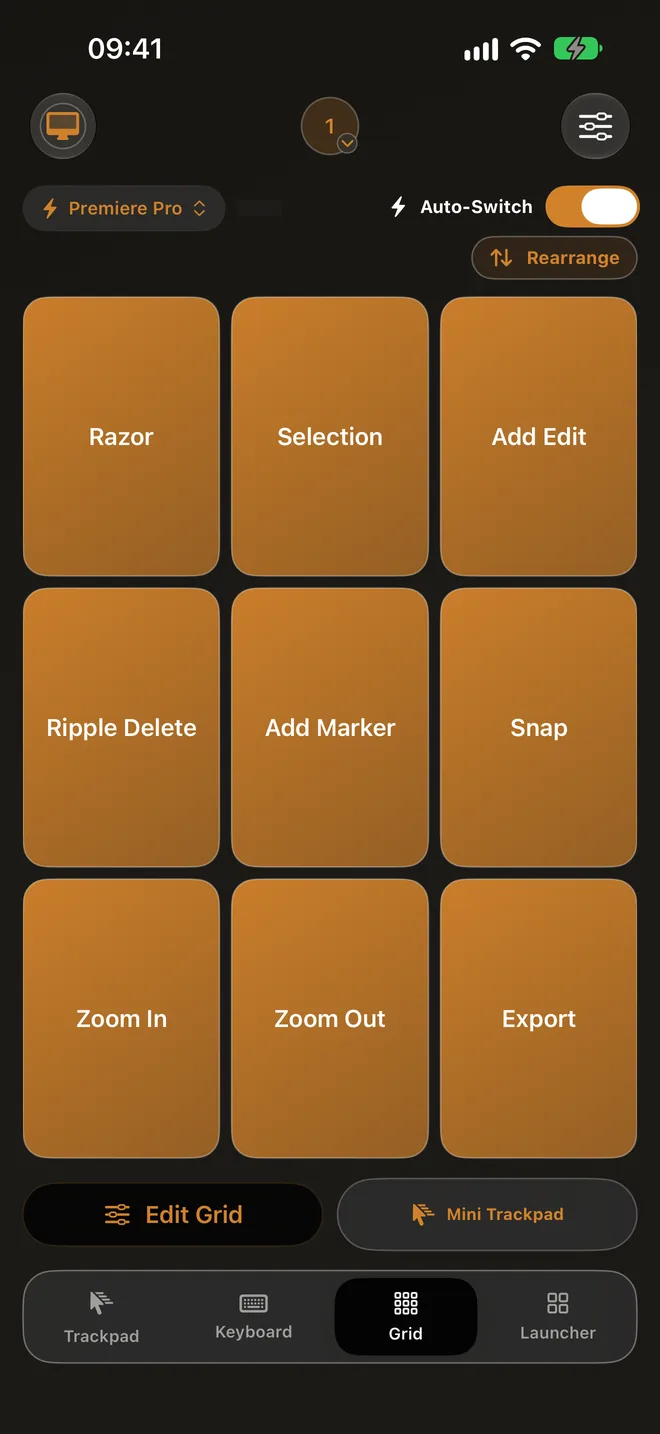
Editing is a stream of small shortcuts: cut, trim, mark, cut again. Control My Mac puts them on a Grid of big one-tap buttons on your iPhone or iPad, and that Grid switches in by itself whenever Premiere is in front on your Mac. No extra hardware on the desk.
macOS 14+ · iOS/iPadOS 18+ · Free Mac app · No account
A starter Grid for Premiere Pro
Twelve buttons for a typical cutting session, using Premiere's default Mac shortcuts. Rename them, reorder them, or swap in the ones you use most.
| Button | Mac shortcut | What it does |
|---|---|---|
| Razor | C | Switch to the Razor tool |
| Selection | V | Switch back to the Selection tool |
| Add Edit | Command-K | Cut the targeted tracks at the playhead |
| Add Edit, all tracks | Shift-Command-K | Cut every track at the playhead |
| Ripple Delete | Option-Delete | Delete the selected clip and close the gap |
| Trim start | Q | Ripple trim the start of the clip to the playhead |
| Trim end | W | Ripple trim the end of the clip to the playhead |
| Mark In | I | Set an In point |
| Mark Out | O | Set an Out point |
| Add Marker | M | Drop a marker at the playhead |
| Transition | Command-D | Apply the default video transition |
| Export | Command-M | Open Export |
Default Mac shortcuts from Adobe's Premiere keyboard shortcuts, editing and trimming help pages, checked September 2026. Ripple Delete is Option-Delete in the Timeline panel. Adobe now calls the app simply Premiere.
Set it up in a minute
You need the free Mac app and Control My Mac on your iPhone or iPad, paired once with a QR scan. Then:
1. Open Premiere Pro on your Mac
Bring Premiere Pro to the front. Control My Mac on your iPhone or iPad sees which app is in front.
2. Tap “Grid for Premiere Pro”
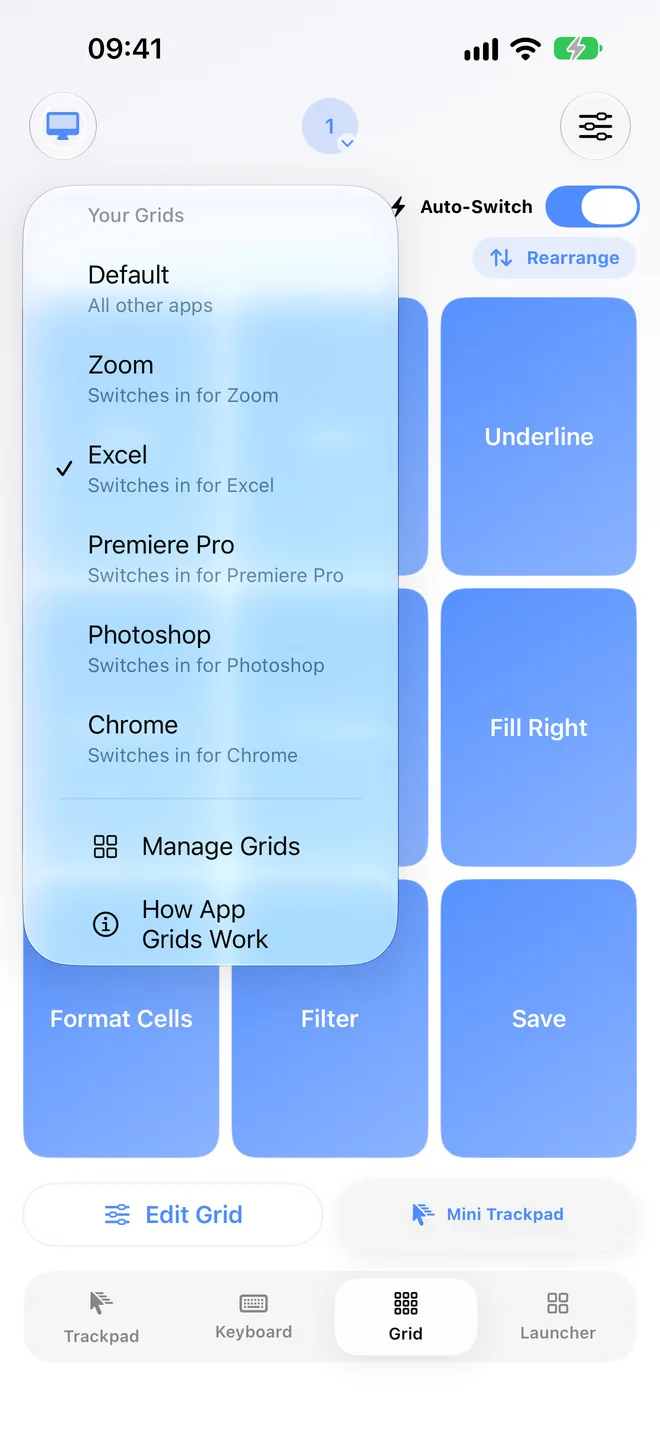
In the Grid, the button names the app that's in front. One tap makes a Grid just for Premiere Pro, starting as a copy of your Default grid.
3. Add your buttons
Tap an empty square (+) on the Grid, tap Start Listening and press the shortcut on your Mac's keyboard, then Stop Listening and Bind. Or tap Enter shortcut manually to pick the keys. Buttons copied from Default can be changed by touching and holding them (Re-record or Clear). Tap Edit Grid to add a row if you want all twelve, and Rearrange to move buttons where your thumb rests.
4. Leave Auto-Switch on
From now on the Premiere Pro Grid appears by itself whenever Premiere Pro is in front, and every other app uses Default. Turn Auto-Switch off if you want one Grid to stay put.
Good to know
Full App. A Grid for each Mac app and Auto-Switch are part of Full App: $3.99 a month in the US after a 7-day free trial, renewing until you cancel, or $17.99 once. The free Essentials plan includes one Grid button, so you can try the idea first.
Keyboard shortcuts only. Each button sends a key combo, or a few in a row, to your Mac. It doesn't run plugins, scripts or typed text, so anything you can't do with a keyboard shortcut in Premiere Pro is out of reach for the Grid too.
Learning from the Mac. Recording a shortcut by pressing it on the Mac needs the Input Monitoring permission for the Mac app. It only listens while you're recording and saves just the combo. You can also set every shortcut by hand.
Your shortcuts, not ours. The list above uses Premiere Pro's default Mac shortcuts. If you've changed yours, record them from your Mac instead and the buttons will always match.
Questions people ask
Can I use my iPhone as a Stream Deck for Premiere Pro?
For keyboard shortcuts, yes. Control My Mac gives Premiere its own Grid of one-tap buttons on your iPhone or iPad, and it switches in whenever Premiere is in front. It doesn't use Stream Deck plugins, so it sends shortcuts rather than plugin actions.
Does it work with the new Adobe Premiere?
Yes. The Grid sends keyboard shortcuts, so it works with any version that uses them, including the app Adobe now calls Premiere.
What if I changed my Premiere shortcuts?
Record each button by pressing your shortcut on the Mac, and the button sends exactly that. The table above uses Adobe's defaults.
Do I need an iPad?
No. It works on iPhone. On iPad the Grid is bigger, with room for more buttons.
Cut faster with the phone on your desk
The Mac app is free. Start the 7-day free trial of Full App on iPhone or iPad to give every Mac app its own Grid. It then renews at $3.99 a month in the US unless you cancel. If you cancel, Essentials stays free with the trackpad, keyboard basics and one Grid button.
macOS 14+ · Apple silicon · Intel Macs up to version 1.2.3 · No account